Point of sale
How to batch out a Dejavoo terminal
Stratamize walks through closing the batch on Dejavoo Android and Z-line terminals, using the steps in Dejavoo’s quick reference guides.
About two minutes. Our team follows up.
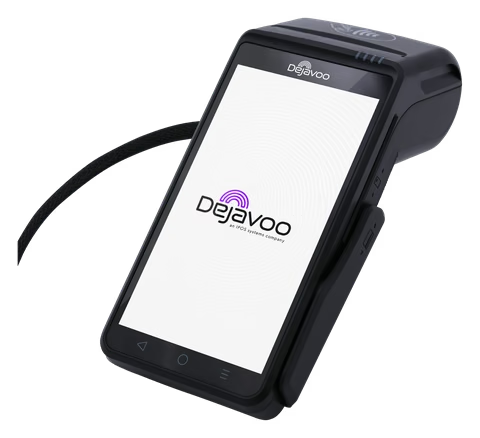
Batching out
What closing the batch does
A batch is the group of approved card sales sitting in the terminal. Closing it sends those sales for settlement. Dejavoo calls the action Settle Daily Batch, and on most builds it is two or three taps.
Two things are worth doing before you settle. First, fix mistakes. Dejavoo’s manual says a void only works while the sale is still in the open batch. After the batch settles, the correction is a return. Second, enter your tips. On the iPOSpays software the terminal warns you about untipped sales when you settle, and ADJUST TIP sits in the same Favorites menu.
The steps depend on the software, not only the model. Not sure which you have? Find your software first.
QD and P terminals
Android terminals with AURA
Dejavoo’s quick reference guide for Android terminals with AURA gives these steps. A provider guide for the QD2, QD3 and QD4 shows the same ones.
- Open FAVORITES
- Tap SETTLE DAILY BATCH
- Wait for the host
- Keep the report
QD and P terminals
Android terminals with iPOSpays software
Dejavoo’s guide for QD and P Series models using iPOSpays software labels the option differently.
- Tap the star icon
- Tap SETTLE
- Tap YES
REPORTS, under the same star icon, prints an open or closed batch as a Summary, Daily, Un-Tipped or Tipped report. Print the open batch first if you want to check totals before you settle.
Z-line terminals
Z9, Z11 and keypad models
On the touch screen Z9 and Z11, Dejavoo’s guide matches the AURA steps above: the star icon, then SETTLE DAILY BATCH.
On keypad models, Dejavoo’s user manual goes through the Core Menu:
- Open the Core Menu
- Choose SETTLEMENT
- Read the response
The manual notes one difference worth knowing. Settlement in the Core Menu closes every application on the terminal, such as credit, debit and gift. The Settle Daily Batch option inside the Credit and Debit menu closes only that one.
Auto-batch
Who sets auto-batch, and where
On terminals managed in the iPOSpays portal, settlement is one of the terminal’s parameters. Dejavoo’s portal manual gives two choices. Manual means you settle from the terminal. Automatic means the provider picks a mode and a time. If your terminal closes on its own every night, that is where it was set, and a different time is a request to your provider.
On the older Z-line software the terminal has its own menu: Core Menu, SETTLEMENT, then BATCH SETTINGS. The manual lists three options. Dial sends the batch at a time you key in on the 24-hour clock, then asks how often and how long to retry if the first attempt fails. No Dial clears the terminal’s batch and prints a report without contacting the host, for accounts where the host closes the batch itself. Off means you settle by hand every day.
There is a catch. One provider’s help center says of its own touchscreen terminals that a change made at the terminal lasts only until the next batch and then goes back to the settings on file. If you want a new time to stay, ask the provider to change the file.
When it does not close
If the settlement report does not print
Do not run the day’s cards again. Check what the terminal still holds first.
- Look at the Wi-Fi icon. Dejavoo’s guides say it blinks when the terminal is not connected, and a batch cannot be sent without a connection. See connecting to Wi-Fi
- Write down the exact response on the screen. Your provider will ask for it
- Print the open batch report. If the sales are still listed, the batch has not closed and you can try again
- If your terminal takes offline sales with store and forward, Dejavoo’s guide says the terminal asks to forward stored sales when you settle, and failed ones have to be cleared before the batch will close
- If it fails twice, call your provider before the end of the day
A second look
Provider not helping?
Stratamize is an independent merchant services agent. If the company that set up your terminal is not answering, we can review the setup with you and tell you what to ask for. Changes to an existing terminal file still have to come from the provider on that account.
If you would rather move, you apply for a merchant account in your own business name through one of our banking partners, subject to approval, and we program the terminal with you.
Do I have to batch out every day?
Dejavoo calls it the daily batch for a reason: an approved sale is not sent for settlement until its batch closes. Ask your provider what time the batch has to close.
Can I void a sale after I batch out?
No. Dejavoo’s manual says a void only works while the sale is in the open batch. After settlement you process a return instead.
Why did my terminal settle on its own?
Automatic settlement is on. On terminals managed in the iPOSpays portal the provider sets the mode and the time in the terminal’s parameters.
Can I change the auto-batch time myself?
On some Z-line terminals the Batch Settings menu lets you. One provider says of its own terminals that the change goes back to the settings on file after the next batch, so ask your provider to change the file.
Sources
Where these facts come from.
- Dejavoo, Quick Reference Guide, EMV Retail, Android terminals with AURA (copy hosted by Paystri), checked 2026-11-20
- Dejavoo, Quick Reference Guide for QD and P Series Android models using iPOSpays software (copy hosted by GETTRX), checked 2026-11-20
- Dejavoo, Quick Reference Guide, EMV Retail, touch screen Z-Line Z9 and Z11 (copy hosted by GETTRX), checked 2026-11-20
- Dejavoo, User Manual for all terminal products: Settle Daily Batch and Batch Settings, checked 2026-11-20
- Dejavoo, AURA manual for Android, Transactions: voids and returns, checked 2026-11-20
- Dejavoo, iPOSPays User Manual: Settlement parameter, checked 2026-11-20
- Dejavoo, Store and Forward guide, checked 2026-11-20
- Xplor Pay help center, Dejavoo QD line, checked 2026-11-20
- Stax Payments help center, Settlements and Batching, checked 2026-11-20
- Stax Payments, Quick Reference Guide for non touch screen Z models, checked 2026-11-20
Point of sale
Tell us how your terminal settles today.
We recommend the setup, quote it and set it up with you.
Every merchant account is subject to underwriting approval.
Ask about Dejavoo by email